Multi-level navigation: the challenge of identifying parent sections for screen readers
Many guides show you how to build an accessible navigation menu, but they overlook the "you are here" complexity. How do we translate an "active parent" visual highlight into something a screen reader user actually understands?

The UX necessity: the "active parent" state
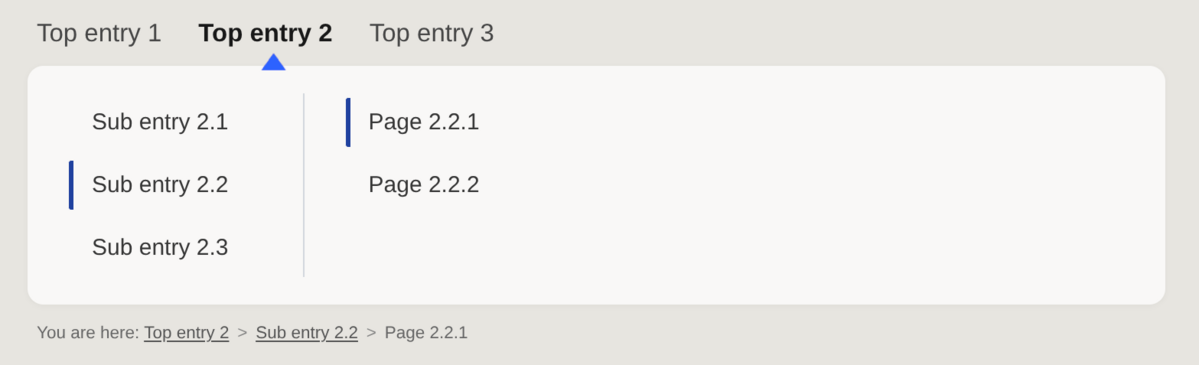
In a mega menu with multiple sub-levels, it is a standard usability practice to visually distinguish the parent section of a level-2 or level-3 page. This helps the user locate themselves within the site's architecture and easily find sibling or parent pages.
Visual solution: Typically, developers use a dynamic CSS class like .active-parent.
The issue: This styling is purely visual and remains invisible to screen reader users unless paired with a semantic attribute.
The breadcrumb limitation
While a breadcrumb can technically replace this visual identification, it isn't a foolproof fallback. Breadcrumbs are often truncated on mobile or even hidden to save space. In such cases, the visual highlighting of the parent section in the navigation becomes the only way to understand the site's hierarchy.
The HTML semantic gap
Accessibility dictates that visual info must be provided non-visually. Ideally, this should be done via native HTML. However, no standard HTML tag exists to distinguish a "parent section" from the "current page." We are forced to look toward ARIA.
Navigating the ARIA landscape
While aria-expanded tells us if a menu is open, it says nothing about whether that section contains the active page. This leads us to aria-current. According to the W3C, aria-current is used when an element within a set is visually styled to indicate it is the current item.
The aria-current most interesting values for our case are:
aria-current="page": Must be strictly reserved for the exact page the user is on.aria-current="location": Often seen in breadcrumbs; screen readers usually announce this as "current location."aria-current="true": A generic state, announced simply as "current."
Can we use multiple aria-current attributes?
Using multiple aria-current tags in the same group can be confusing, as a blind user will hear "current" multiple times. Indeed, combining the value "page" for the active link with values like "location" or "true" for parent items may lead to significant confusion. A screen reader user might struggle to distinguish which entry represents their actual destination versus a structural landmark.
However, the WAI-ARIA 1.2 specifications about aria-current state: "authors SHOULD only mark one element in a set as current." The use of "SHOULD" (rather than "MUST") implies flexibility. In a multi-level mega menu, each ancestor of the current page could theoretically carry aria-current="location". This attribute has excellent support across modern screen readers, including Narrator with Edge.
Alternative solutions: the "hidden label" approach
The W3C’s own navigation menubar example offers a different path by using the title attribute. Adding title="contains current page link" to the parent entry provides supplementary info, and since title does not replace the visible label in the accessibility tree, it acts as a helpful hint.
Another solution is the sr-only span. This involves adding a visually hidden span inside the link: <a href="...">products <span class="sr-only">(current section)</span></a>. Using this method, the accessible name would still start with the visible label, which is inline with the accessibility requirements.
Conclusion
Navigating the nuances of digital accessibility requires more than just following a checklist; it requires balancing technical standards with real-world user experience. Choosing between an unusual ARIA implementation—which might suffer from inconsistent assistive technology support or confuse screen reader users—and a less semantic "patch" like a hidden span is a complex architectural decision. There is rarely a "one-size-fits-all" answer, as the best approach often depends on the specific context of your site's navigation and its users.
At Eleven ways, we specialize in solving these intricate puzzles. We believe that true accessibility goes beyond mere compliance; it’s about making digital products intuitive for everyone. Our team provides the deep expertise needed to audit, consult, and train your developers, ensuring that even the most complex mega menus are inclusive by design. Whether you are navigating the latest WAI-ARIA specifications or looking for pragmatic, browser-tested solutions for your users, we are here to help you bridge the gap between code and usability.
Latest articles
-
Help! I'm getting criticism about my website's accessibility. Now what?
In late August 2026, usability experts said that the website of the Federal Agency of the Debt, where citizens can buy government bonds, is a textbook example of how not to build a website. That criticism wasn't new: three years earlier, the same editorial team had already said the site was outdated. The Agency promised at the time to work on it. Since then, nothing has changed, and there aren't even plans anymore, because the budget is lacking.
-
Bingo! Do you recognize these excuses about accessibility?
"Someone who is blind doesn't need our website anyway, right?" Anyone who has ever worked on a web project has definitely heard this sentence (or a variant of it) before. Usually in a meeting, usually right at the moment accessibility finally made it onto the agenda.

Popular articles
- Help! I'm getting criticism about my website's accessibility. Now what?
- Accessibility Statement Generator
- Tooltips that work for everyone
- Star raters are more challenging to make accessible than you might think
- Fixing digital accessibility issues with the press of a button: too good to be true?
- Combined 50 years of accessibility expertise: an expert interview
How can we help your organisation?
-
Mail your question : info@elevenways.be -
Call us : +32 (0)78 079 111